




This article details a procedure to guide you on how to get an NCBA bank account statement online in Uganda. NCBA bank will only show you a min-statement via their mobile platforms. The Mini Statement is described as a compressed form of account statement that shows you details of the last 5 account transactions. The NCBA bank account mini statement will show you transaction details like the money deposited, money withdrawn, and the relevant charges.
Contents
Here is How to Get an NCBA Bank Account Statement Online in Uganda
NCBA account holders can request their bank account statements by dialing the NCBA USSD shortcode (*212#) or by checking the balance via the NCBA mobile App. For whichever method the customer prefers, they must have registered for NCBA mobile banking to access this service.
Use NCBA Mobile App
This method will require the customer to download and install the NCBA mobile app from Google Play Store and App Store. After successful download, follow the steps below to view the account balance.
1. Open the NCBA mobile app on your device.
2. Click on Login and login with the required credentials.
3. On the home page, click on the “Accounts” feature.

4. Tap on the Mini-statement option.
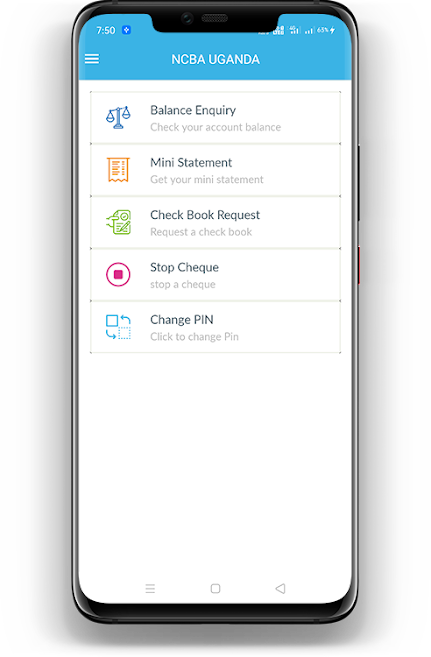
5. Select the account whose statement you want to view.
6. Your account statement will pop on the screen.
Read Also: How to Check your NCBA bank account balance online in Uganda
Use NCBA USSD Shortcode
This is the simplest and the get-to-go method that can be used on any phone. To get started, launch the phone app and follow the step-by-step guide below to request fo your NCBA bank account statement.
1. Dial *212# and press the send button.
2. Enter the NCBA mobile banking pin as prompted.
3. Select an option that corresponds to “Mini Statement” from the list of displayed options.
4. Choose the account whose statement you want to view.
5. The last five transactions will appear on your phone screen.


